Every Stripe, Paddle, App Store, Google Play, RevenueCat, PayPal, Polar, Shopify, Creem, Gumroad
payment.Know where your sales come from

All your projects. Revenue, traffic and sales in one clear picture.
22 payment providers·28 integrations
The demo runs on our own apps, with example numbers.
-
TimeLoop Google Play · in the app · via RevenueCat 🇪🇸 +€4.99
-
TimeLoop Stripe · on the site · from TikTok 🇧🇷 +€4.99
-
-
- TrafficEvery visitor, where they came from and what they read, live.
- PaymentsMRR and every payment from 22 payment providers, per project and added up.
- Where buyers came fromEach payment counts for the visit that brought the buyer, on your site and in your app.
- What changed revenueSearch Console clicks, mentions and your own marks, on the revenue chart.
Every way in. One number.
22 payment providers, from Stripe and Paddle to the App Store, Google Play and Shopify, added up after fees and refunds, in euros.
 Shopify
+€38
Visitors and sales, on one line.
The script that counts your visitors also ties each sale to the visit that brought it. When a post sends a crowd, you see whether it bought.
What one visitor brings, by source · 90 days
-
Bing €0.49
-
 Pinterest
€0.39
-
 Google
€0.32
-
 ChatGPT
€0.28
6 Nov · Google
+1,519 visitors → 0 paid · €0
Each day's visitors above, its sales below. The 0 paid are the people Google sent that day who went on to buy.
Every visitor, live on a globe.
One line of script on your site: where people are and where they came from, and the sales they make land there too, with what brought them. No IP address is kept.
 Instagram/compatibility
 Newsletter/
- 🇨🇦/ · TorontoDirect
- +€4.99TimeLoop · Stripe🇧🇷
- 🇩🇪/ · BerlinGoogle
Know which visit paid.
A buyer's way, from where they found you to the payment, days later.
-
 TikTok
Finds youthrough TikTok
- /pricing Reads your pricingon TimeLoop's site
- €4.99 Pays, days laterthrough Stripe
- TikTok +€4.99 Sumly ties it back€675 from TikTok in 90 days
See why the line moved.
Every jump, marked where it happened. When Reddit, Hacker News, Bluesky, YouTube or a blog mentioned you that day, the mark says which post.
 Reddit post in r/SideProject
See why sales moved.
Google clicks, new customers and revenue on the same weeks. When one falls you see it carry into the next, and the mark names the day, how much fell and the pages that lost the most.
Sumly reads your payments, its own visits and the places you were mentioned, and Google Search Console, so the reason sits next to the number.
Why are my sales down? →The month, packed for your accountant.
On the 1st, one zip from every provider you connect: by project, by country, EU or outside the EU, payouts to the bank, and a summary PDF.
It lists what is still missing, such as a Stripe Tax Invoice, and goes to your accountant by mail when you say so, in English or Slovenian.
Monthly reports →-
-
Paddle17 payments€1,306
-
Polar9 payments€612
-
RevenueCat58 purchases€2,940
-
What did each cost bring back?
Ads, sponsors, creators. Tie a cost to where its people came from, and Sumly sets what they paid against what you spent. Hosting and AI count too, against all you made.
-
TikTok ads · TimeLoop −78%spent €4506 paying · brought €101 · +€22 a month
-
8 creators · TimeLoop +84%spent €36038 paying · brought €662 · +€125 a month
-
Reddit ads · Humanize −30%spent €27011 paying · brought €188 · +€86 a month
-
Newsletter sponsor · Humanize −69%spent €2004 paying · brought €63 · +€32 a month
-
Pinterest ads · AstroChart +46%spent €1807 paying · brought €262 · +€47 a month
Or just ask.
In plain words, here or from ChatGPT and Claude over MCP. It reads your numbers; it changes nothing.
Humanize brings the most, €1,768 a month.
Across all five, 84 new subscriptions added €603 in 30 days and 40 cancellations took €345.
Sumly for iPhone and Android
Every sale in your pocket, the moment it happens.
The same account you use on the web: your projects, your numbers and who is on your sites, with a notice for every sale.
- Every sale, as it happensA notice for each sale and refund, with a till sound if you like.
- Each project, or all of themMRR, net revenue, visitors and buyers, per project or added up.
- Who is on your sites nowA live globe or map, with the pages they read and where they came from.
- WidgetsToday's revenue, MRR and the people on your sites, on the Home Screen and Lock Screen.
- Your team tooEveryone on your team signs in with their own account and picks their own notices.
- Nothing to buy in the appYour plan comes from the web; the app sells nothing and shows no ads.
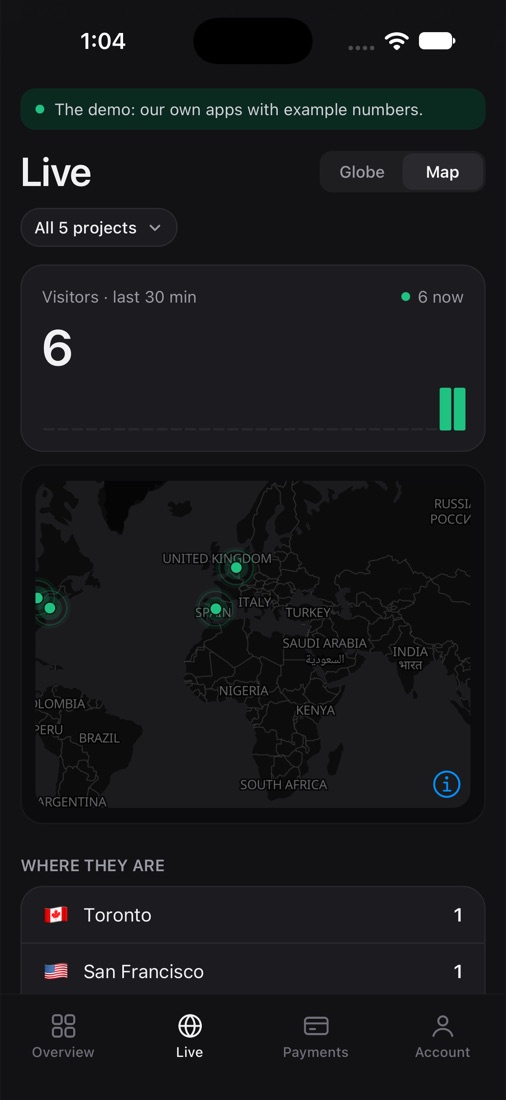
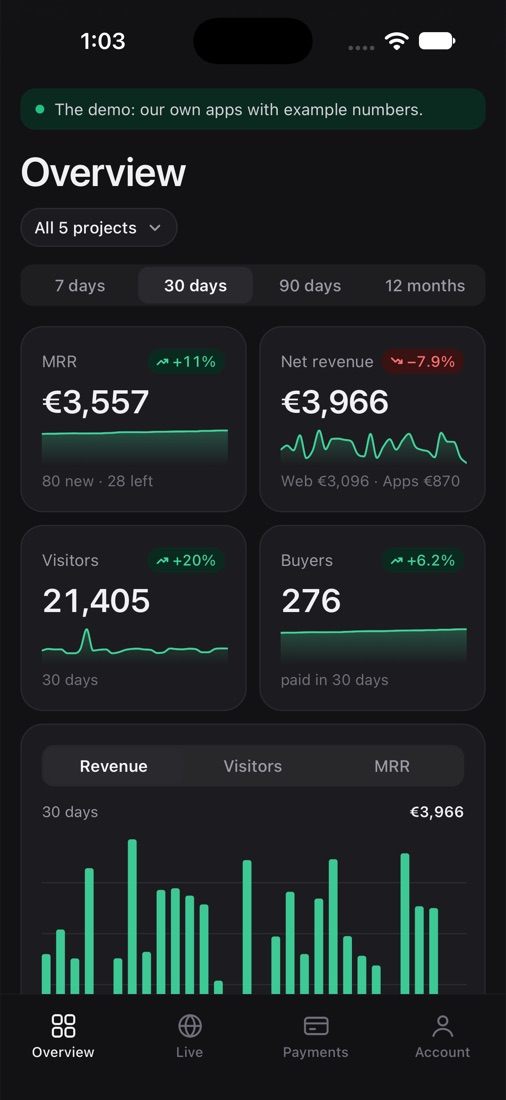
Screens from the app with the demo's example numbers. On Google Play now, coming soon to the App Store.
Now look around.
The real product, with our own apps and example numbers. Or open it yourself and click through everything.
MRR, revenue, profit and customers of every project, with the days that moved them.
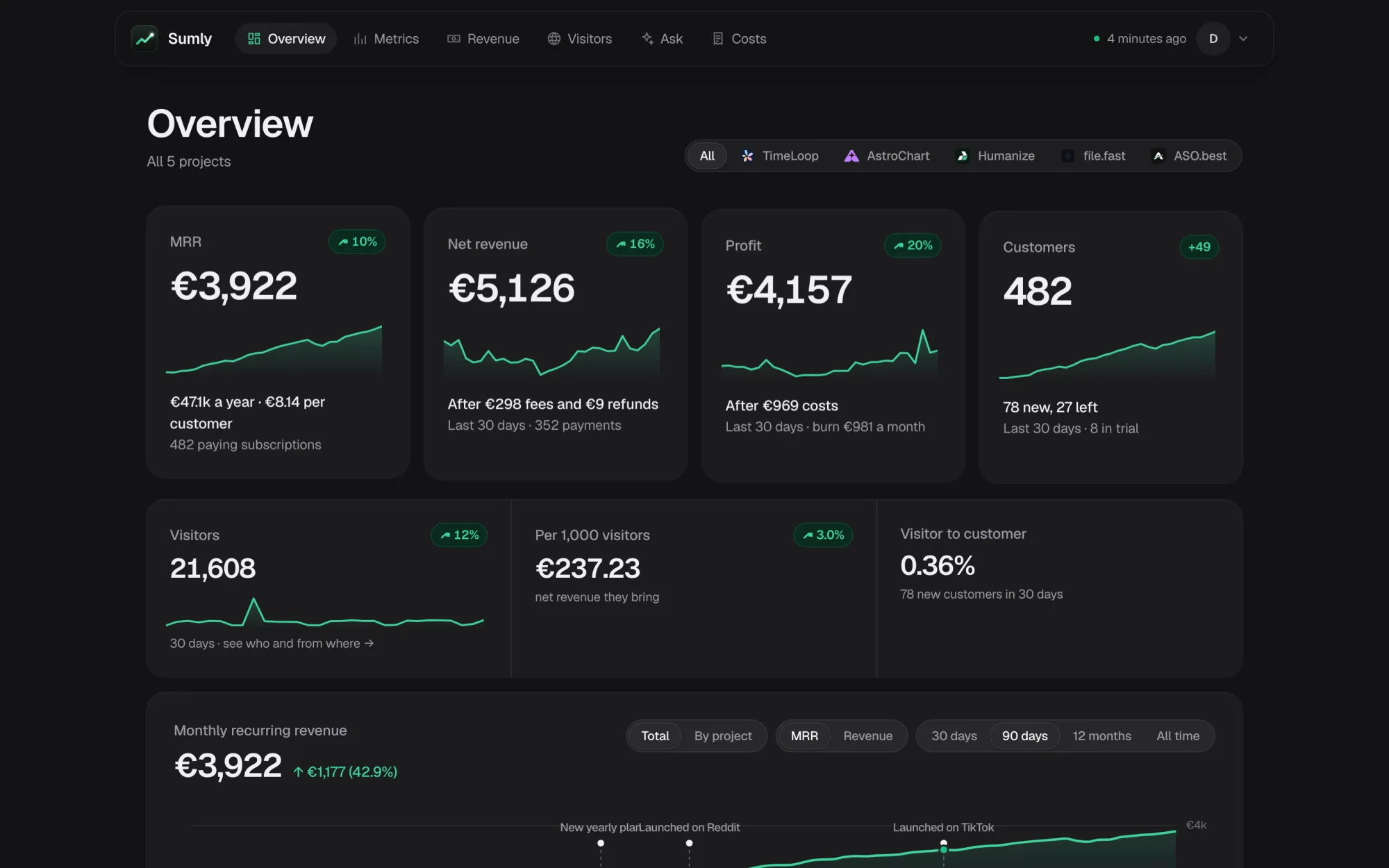
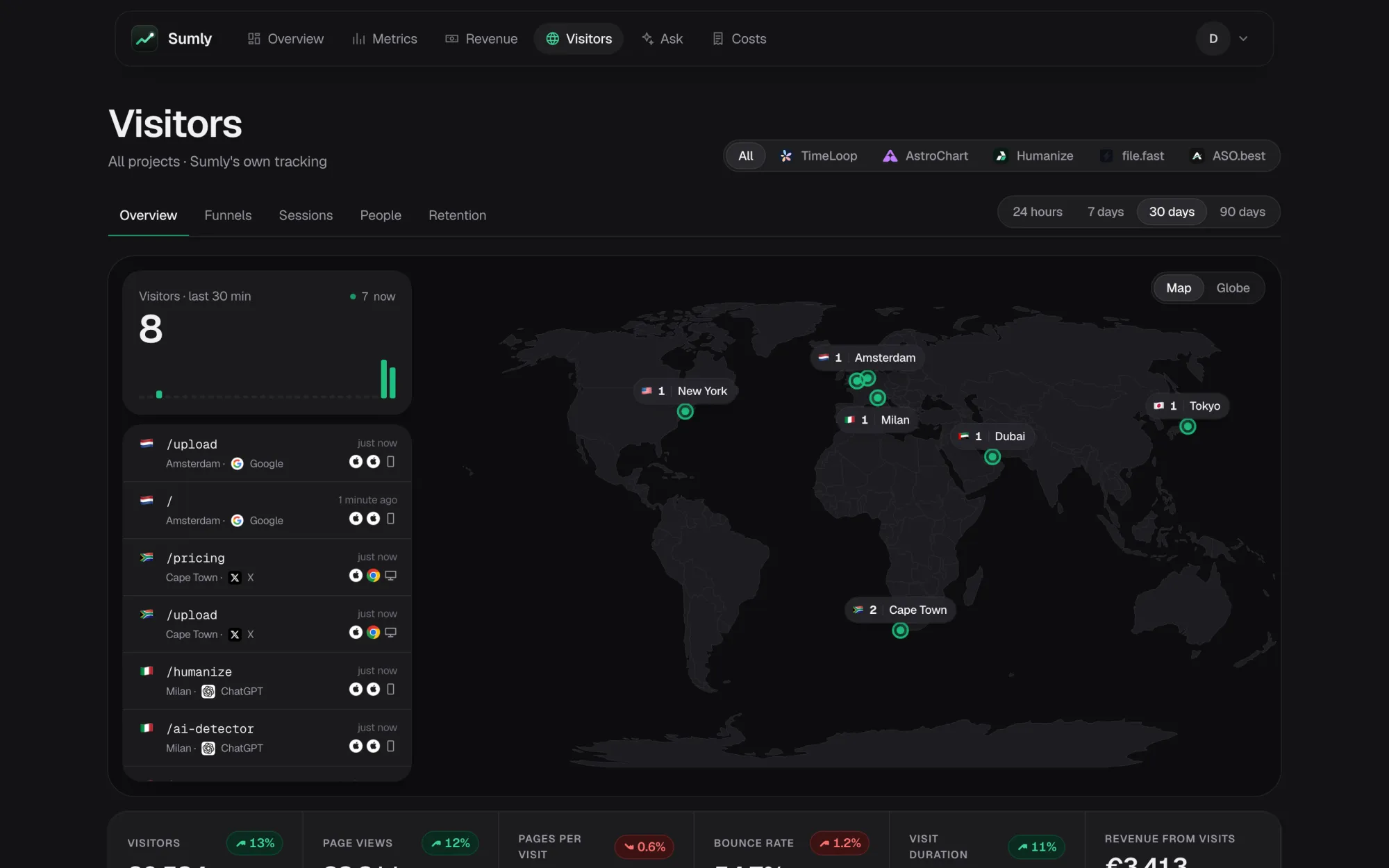
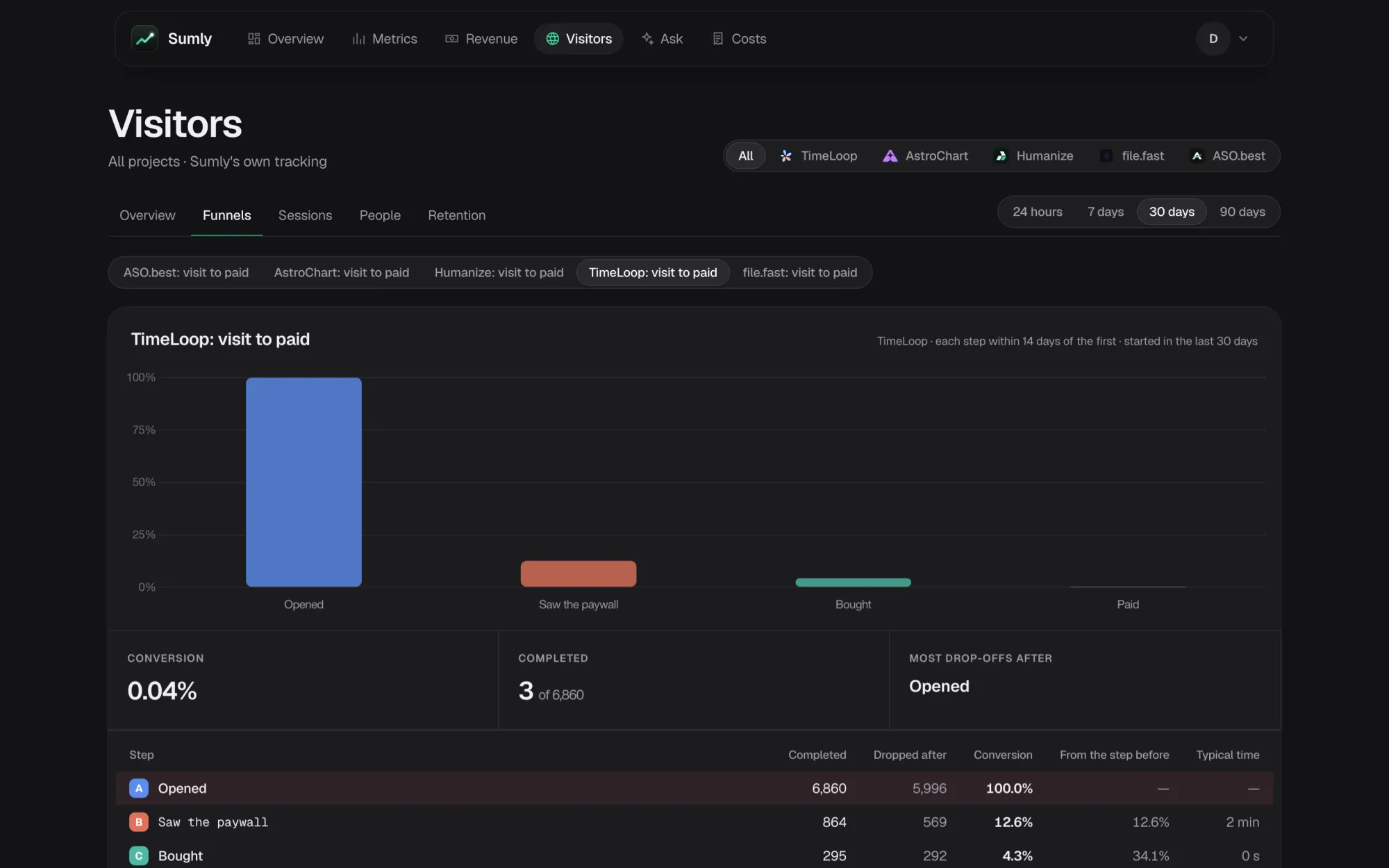
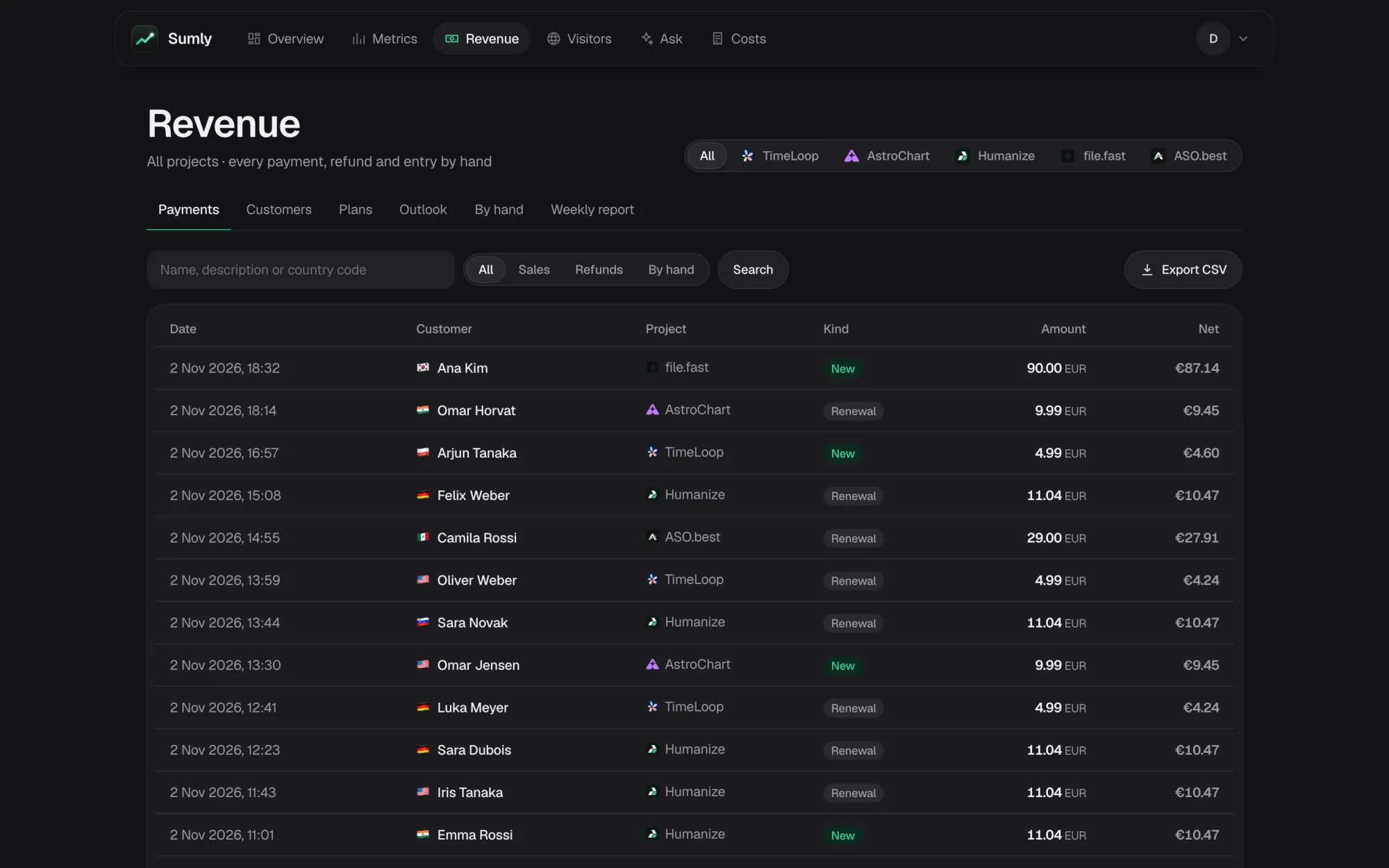
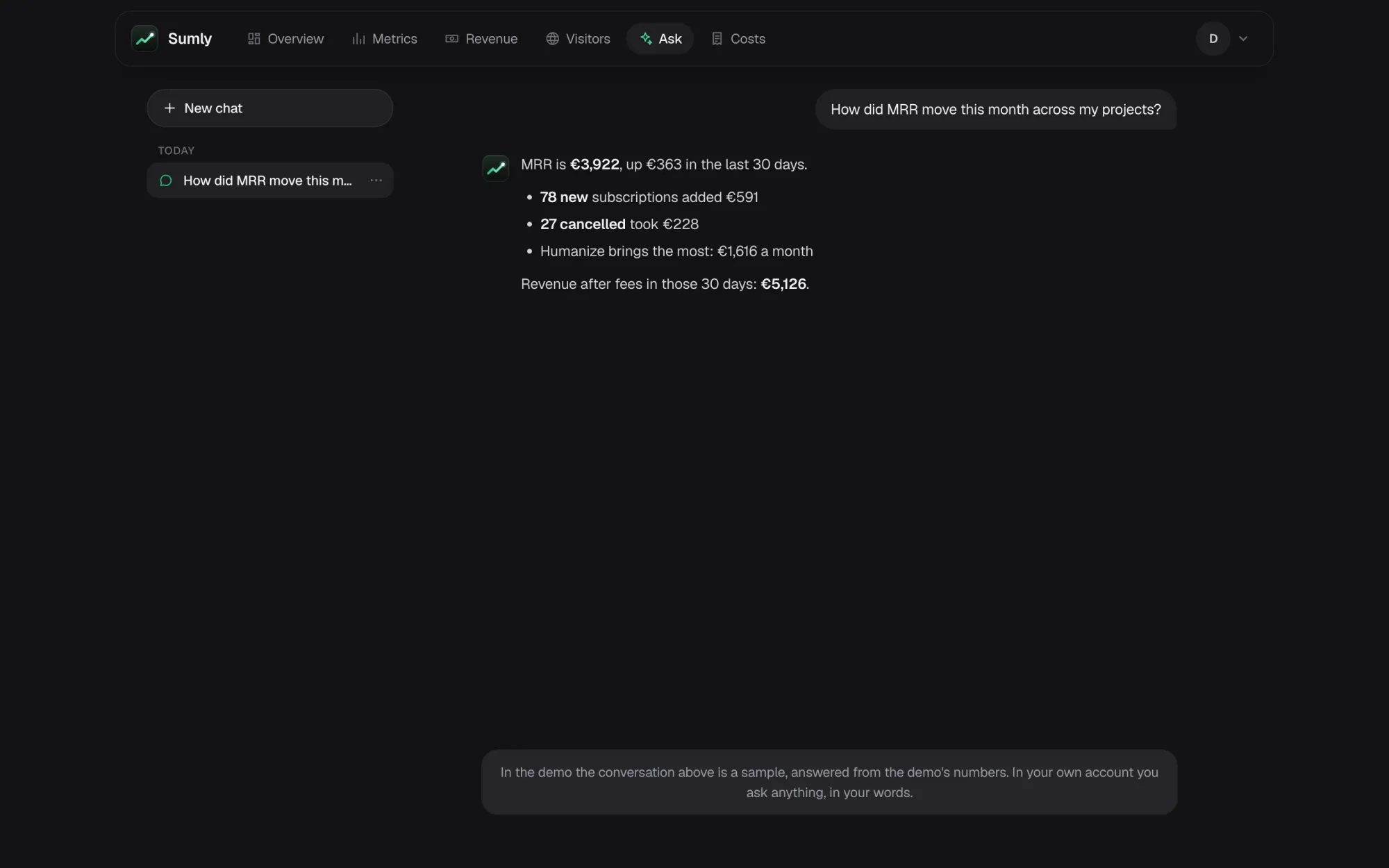
Three steps, no code in your checkout to start
-
1
Connect a read-only key
Stripe, Paddle, Lemon Squeezy, Polar, Creem, RevenueCat, the App Store or Google Play. Up to three years of payments are read at once.
-
2
Add one line to your site
The script goes in your page head. Visitors start counting, with where they came from, and your store buttons carry the visit to your app.
-
3
See which visits pay
Stripe Payment Links, pricing tables, Polar links and Paddle buttons carry the visitor by themselves. Your own checkout takes one line.
From visit to install to payment
Someone reads your site, taps the App Store or Google Play button and later pays in the app. Sumly ties the three together: exactly on Android, as a marked estimate on iOS.
-
The store button carries the visit
The site script adds where the visit came from to your Google Play links and counts each tap on them and on your App Store links. Nothing to change on the page.
-
The install is tied to it
Android is exact: Google Play hands the visit to your app. iOS is an estimate: one tap on your site and an install from the same network within the hour, matched by a hashed IP, first-party, and marked as one. No advertising id, no fingerprint.
-
The app's payments count for the source
What they pay through RevenueCat lands in revenue by source, with a Web to app funnel beside it. Someone who never visited your site cannot be traced to it.
How it works, with the SDK, from your server or with the site alone
Your keys stay yours
Read-only keys wherever the provider has them, encrypted at rest with AES-256, used only on the server and never sent back to a browser. Disconnect, and the key and everything read with it are deleted.
No IP addresses
Country and city come from the request, the address is never kept; a tap on an App Store button keeps only a hash of it, for an hour. In the EU and UK no cookie until the visitor agrees, and raw visits go after 25 months.
A team, with limits
Invite people as viewers, members, admins or your accountant, each to whole companies or to the projects they work on.
Several businesses in one account →Revenue tools and analytics tools, in one
Subscription dashboards do not count visitors, and analytics tools do not read your billing. Where the others are ahead is here too. Checked on their own pages, 3 November 2026.
| Sumly | DataFast | ChartMogul | Plausible | OpenPanel | |
|---|---|---|---|---|---|
| Subscription metrics from your billing | — | — | — | ||
| Visitor analytics | — | ||||
| Revenue by traffic source | partly | partly | partly | ||
| Who is likely to pay, from your own payers | partly | — | — | ||
| Costs and ROI by source, campaign and creator | partly | — | — | — | |
| Brand mentions marked on the traffic chart | partly | — | — | — | |
| App users met with their RevenueCat purchases | — | — | — | — | |
| App Store and Google Play read directly | — | — | — | ||
| RevenueCat, Lemon Squeezy, Polar and Creem | partly | — | — | — | |
| Several companies in one account | — | — | partly | partly | |
| Monthly package for your accountant | — | partly | — | — | |
| Mobile app for iOS and Android | Android, iPhone soon | — | — | ||
| Open source, can be self-hosted | — | — | — |
Partly: ChartMogul through attributes you send it, and a likelihood on sales leads without saying what it is built from; Plausible on its Business plan; OpenPanel from revenue events your own code sends; DataFast with Lemon Squeezy and Polar but not RevenueCat or Creem, mentions from X and Reddit, and Meta Ads as its only cost; ChartMogul's package is invoices and transactions sent to storage on a schedule, without a split by country. For several companies: Plausible adds up the sites of one team on its Business plan, and OpenPanel groups projects in an organization without a view across them. Coming: Sumly's app is being built. A dash: not offered, or not found on their own pages. Details and sources on each comparison page.
Click through all of it
Our own apps (TimeLoop, AstroChart, Humanize, file.fast and ASO.best) with example numbers: half a year of payments and three months of visitors on the web, iOS and Android. The demo is the real product, rebuilt each night.
Open the live demo- Overview with milestones
- Metrics over time
- Payments and customers
- Live map and globe
- Funnels and journeys
- Sessions and people
- Retention
- Ask
Simple prices
Every plan reads every provider. Each paid plan is free for 14 days with no card, and the first 50 who pay keep a third off for as long as they stay.
Founding 50: $65 a month, for life
- Unlimited projects
- You and 2 more in the team
- Every provider: Stripe, RevenueCat, the App Store, Google Play and more
- MRR, revenue, customers and visitors
- Where buyers came from, ROI and costs
- Ask in Sumly, 50 questions a month
- MCP in Claude and ChatGPT, unlimited
- Weekly report and jump marks
- 50,000 visits a month
$0 due today. No card required.
Founding 50: $1210 a month, for life
- Unlimited projects
- Everything in Starter
- Your whole team, as viewers or editors, each limited to their projects
- Ask in Sumly, 300 questions a month
- MCP in Claude and ChatGPT, unlimited
- 500,000 visits a month, or up to 5 million as you grow
$0 due today. No card required.
There is no free plan. After the trial, a workspace that does not pay becomes read-only, and its data is kept for 30 days. To look around first, open the demo; it needs no account.
Prices in US dollars, before tax. More than 5 million visits a month? Write to us.
Moving from DataFast, Plausible or OpenPanel? Bring your history.
Questions
Which payment providers does Sumly read?
22 payment providers: Stripe, Paddle Billing, Lemon Squeezy, Polar, Creem, RevenueCat, the App Store and Google Play directly, and 14 more, such as Shopify, WooCommerce, PayPal, Gumroad and Adapty. A project can use several at once, for example Stripe on the web and RevenueCat in its app, and Sumly adds them up and shows what each brings.
Can Sumly change or move my money?
No. It asks for read-only keys wherever a provider offers them, keeps them encrypted, and never writes to your payment accounts.
How are visitors counted?
A small script on your site. It keeps a first-party id, stores no IP address, and takes country and city from the request. In apps, Sumly counts the money, not what people do inside: payments come straight from the stores or RevenueCat.
How does it know which visit paid?
You pass the visitor id into your checkout (Stripe metadata, Paddle custom data, Polar or Creem metadata, or a RevenueCat attribute). Each payment then counts for the source of that person's first visit.
How does it guess who is likely to pay?
From your own payers. Sumly looks at the project's visitors of the last 90 days and which of them paid. A visitor's chance to pay comes from how often people like them paid: the same device, system, browser, country and source, and as many days of visits. Their estimated value is that chance times what your payers paid on average. Until 5 payers are tied to visits, there is no estimate at all, rather than a guess from a site average. How the estimate works →
What will it cost?
Every plan has unlimited projects; you pay for traffic. Starter is $9 a month for 50,000 visits and you plus two, and Growth $19 a month for 500,000 visits and your whole team, rising with traffic for big sites: $39 for a million visits a month, up to $99 for five million. Both are free for 14 days with no card, and the first 50 who pay keep a third off for life. There is no free plan: after the trial a workspace that does not pay becomes read-only, and its data is kept for 30 days. The demo shows every page without an account.
Switching? Can I bring my history from DataFast, Plausible or OpenPanel?
Yes. Sumly imports DataFast with its API key, Plausible from its export zip or Stats API, and OpenPanel with a read-only client. It keeps only the days before its own script, imported visits never count toward your plan, and each import can be taken back. Import your history →
Is the demo real?
The apps are ours and the pages are the real ones, but the numbers are examples, not our real revenue: the same code reads the demo's subscriptions, payments and visits as it reads yours.
Can I ask questions instead of reading charts?
Yes. Ask answers in plain words from your numbers, and an MCP connection lets ChatGPT or Claude read them with your permission.
Try it with your own projects
Sign in with Google or a code by e-mail and connect your first project. The first 14 days of a paid plan are free, with no card.
Start free trialOr look around first: open the live demo.